Environments
INFO
このページはまだ翻訳されていません。 英語版を読む
For the 43 registered planning, MuJoCo, Newton, and Isaac Lab tasks, the contributor API, and reproducible LeWM notebooks, see Benchmark environments. Tasks are grouped into planning puzzles, control, navigation and locomotion, and manipulation; see the Environments page. This page describes the original pixel-world interface.
torch_world.envs holds worlds to train and test world models in: three light pixel worlds that run on the GPU with nothing but PyTorch, and a MuJoCo pick-and-place task with real robot arms. All are batched (one object steps batch_size worlds at once) and return RGB images in [0, 1].
All of them share one interface:
| member | |
|---|---|
reset(state=None, generator=None) | random (or given) states; returns images (B, 3, size, size) |
step(action) | applies (B, action_dim) actions in [-1, 1]; returns images |
render(state=None, ...) | images of the current or of any states, used for goal images |
collect(num_steps, generator=None) | episodes {"pixels", "actions", "states"}, each (B, T, ...) |
distance(states, goal), success(states, goal) | how far states are from goal states, and whether they reach them within radius |
position(states) | the planar position to reach, for plotting paths |
state, action_dim, state_dim, radius |
PointMass

A 2D point in the unit square, rendered as a dark Gaussian blob on a light gradient. Actions are velocities scaled by max_step. The simplest test: two degrees of freedom, and the position is all there is to see.
from torch_world.envs import PointMass

env = PointMass(batch_size=64, size=32)
episodes = env.collect(16)                    # random actions
goals = env.sample_goals(distance=(0.2, 0.5))  # goal states at a given distance, inside the bounds
Macaw

A Hyacinth macaw flying over the Pantanal: the dynamics of PointMass behind a detailed scene. Its wings beat a quarter cycle per step, so a single frame does not tell the phase but a short history does. render(state) without a phase draws the bird gliding, as used for goal images. Rendering is resolution-free: Macaw(size=192) draws the same states sharper. For videos, render(state, phase, goal=goal) also draws a translucent macaw where the goal is; models see plain frames.
from torch_world.envs import Macaw

env = Macaw(batch_size=16, size=64)
With rooms=True, a rock wall with one gap splits the sky: the TwoRooms task, flown by the macaw. tasks() puts the goal on the other side of the wall, and collect keeps each action with probability 0.8 so that some flights cross the gap. The model notebooks use it.

env = Macaw(batch_size=64, rooms=True)
start, goal = env.tasks()  # (B, 2) each, on opposite sides of the wall
TwoRooms

PLDM's Two-Rooms: the point of PointMass in a square split by a wall with one door. A move into the wall stops at it. tasks() puts the start in one room and the goal in the other, so the way to the goal runs through the door and a planner that only moves toward the goal gets stuck at the wall: the long-horizon test of the comparisons. collect wanders, keeping each action with probability 0.8, so that some episodes cross the door.
from torch_world.envs import TwoRooms

env = TwoRooms(batch_size=64, size=64)
episodes = env.collect(32)
start, goal = env.tasks()  # (B, 2) each, in opposite rooms
RobotCube

Single-cube pick-and-place with a real arm in MuJoCo, after OGBench cube-single. It needs the action extra:
pip install "torch-world[action]"robot | arm | gripper |
|---|---|---|
"ur10e" | Universal Robots UR10e | Robotiq 2F-85 |
"so101" | the open-source SO-101 | its own jaw |
Both come from MuJoCo Menagerie at a pinned commit and are downloaded once into ~/.cache/torch_world/menagerie.
Actions (dx, dy, dz, grip) in [-1, 1]^4 move the gripper target by up to max_step meters, solved by damped least-squares inverse kinematics with the gripper pointing down, and open (grip > 0) or close the gripper. The state is (gripper x, y, z, opening, cube x, y, z) in meters.
from torch_world.envs import RobotCube

env = RobotCube("ur10e", batch_size=32, size=64)
episodes = env.collect(64, noise=0.1)          # play data from a noisy scripted expert

env.reset()
target = env.sample_targets()                  # goal cube positions (B, 2)
goal_states = env.solve(target, steps=60)      # the clean expert's final states, used as goals
env.success(env.state, goal_states)            # the cube rests within one cube width of its goal
collect follows OGBench's play datasets: the noisy expert carries the cube to a target, then picks a new one.
Cameras
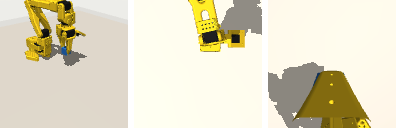
camera selects the observation: "front" (default), "top", an orthographic view of the workspace, or "wrist", which rides on the gripper. render(camera=..., size=...) draws any of them on demand, for example for multi-view models like RoboJEPA. Above, the SO-101 from each camera.
Scoring
For the cube task, distance is in meters between the cube and its goal, success requires the cube to rest on the table within radius (one cube width) of its goal, and position is the cube's position in the unit square of the "top" camera.
Speed
The batch is simulated sequentially on the CPU, so RobotCube is much slower than the pixel worlds. Collect data once and train from a TrajectoryDataset.
Running a policy
from torch_world.envs import run_policy

states = run_policy(env, policy, steps=20)    # (B, steps + 1, state_dim)
policy maps a batch of observations to a batch of actions; see Planning. To compare policies, goal_reaching runs them all and scores them with distance and success.